Try our new AI Activity Summarizer

Default Kit
  • Product
  • Pricing
  • Resources
    • Support
    • Wiki
    • Blog
  • Free Trial
  • Log In
  • Book Demo
  • Product
  • Pricing
  • Resources
    • Support
    • Wiki
    • Blog
  • Free Trial
  • Log In
  • Book Demo

Category - How To Guide

  • Main
  • How To Guide
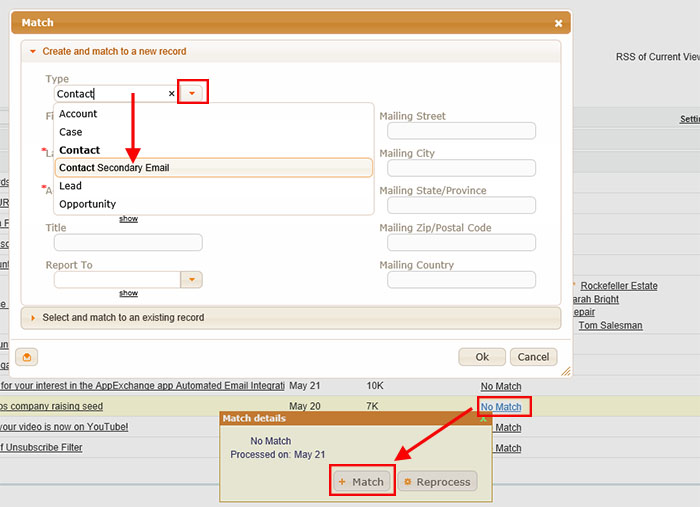
A screenshot showing a software interface for creating and matching records. A dropdown menu under "Type" displays options with Contact Secondary Email selected. Match details below show "No Match" with options to Match or Reprocess highlighted. Various text fields are visible.

Create a new Secondary Email Address for a Contact

  • Date: July 1, 2015
  • By: Trevor Holewinski
  • Categories: B. Create a New Record from Match My Email Cloud
Read More
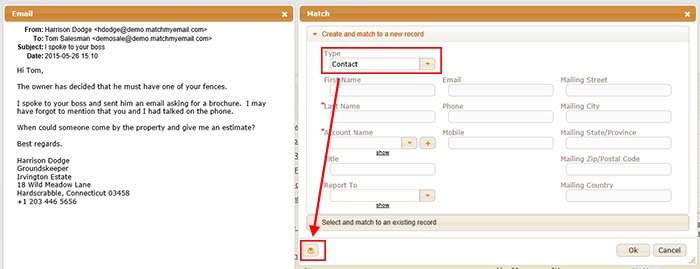
Screenshot of email sent to Tom Silverman requesting advice on replying to an inquiry, and a form for matching a contact with fields for Type, Phone, Email, and other details. An arrow points from the bottom left icon on the email to the Type field in the form.

Create a new Contact for an Account already in Salesforce

  • Date: July 1, 2015
  • By: Trevor Holewinski
  • Categories: B. Create a New Record from Match My Email Cloud
Read More
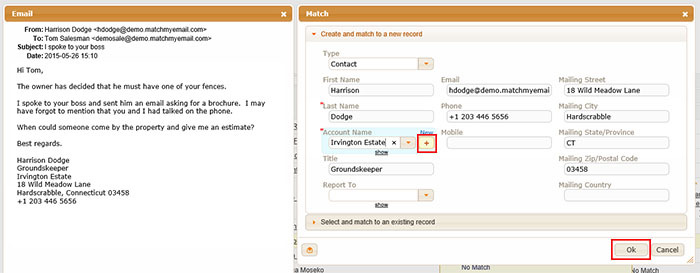
Screenshot showing an email on the left and a data matching form on the right. The email is from Harrison Dodge requesting a property estimate, including personal and contact details. The form fields on the right are filled with matching details from the email.

Create a new Contact and new Account

  • Date: July 1, 2015
  • By: Trevor Holewinski
  • Categories: B. Create a New Record from Match My Email Cloud
Read More
A software interface is displayed with a pop-up window titled "Match." It shows options to create and match to a new record or select and match to an existing record. A red arrow points from "No Match" in the background to the "+ Match" button on the pop-up window.

Create a new Lead

  • Date: July 1, 2015
  • By: Trevor Holewinski
  • Categories: B. Create a New Record from Match My Email Cloud
Read More

Create a New Record Considerations

  • Date: March 9, 2015
  • By: Trevor Holewinski
  • Categories: B. Create a New Record from Match My Email Cloud
Read More

Bulk Manual Match from Email Cloud

  • Date: November 18, 2016
  • By: Trevor Holewinski
  • Categories: C. Manually Match & Unmatch Emails to Existing Salesforce.com Records
Read More
Posts pagination

Previous Page 1 Page 2 Page 3 … Page 7 Next

Try Match My Email

The seamless email integration solution for Salesforce.
No credit card required.

Start 14-Day Free Trial
Home

Product

  • Email Integration
  • Calendar Integration
  • Data Migration
  • Pricing
  • Demo
  • Free Trial
  • Email Integration
  • Calendar Integration
  • Data Migration
  • Pricing
  • Demo
  • Free Trial

Resources

  • Login
  • Support
  • Wiki
  • Sitemap
  • Login
  • Support
  • Wiki
  • Sitemap

Company

  • About
  • Blog
  • Contact Sales
  • Legal
  • Security
  • Privacy Policy
  • About
  • Blog
  • Contact Sales
  • Legal
  • Security
  • Privacy Policy

Connect

Facebook-f X-twitter Linkedin-in Youtube

© 2026 All Rights Reserved. RAE Internet Inc. Salesforce is trademark of Salesforce.com, Inc. and are used here with permission.