
Bulk Removal of Emails and/or Attachments in Salesforce
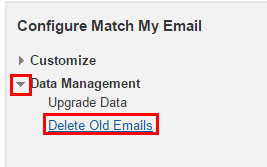
helpH2 Bulk Deletion when Uploading to Match My Email Custom Object Uploading to the Match My Email custom object affords you the use of additional tools within the installed package. One of these is a bulk delete tool that allows you to delete emails and/or attachments across all records. It is important to remember that, […]
Manually Reprocessing Emails
helpH2 Manually reprocessing emails can only be done from the Match My Email cloud. It is strongly suggested that you do not manually reprocess more than 500 emails per 24-hour period due to API call limits in Salesforce. One way to reprocess a message in one click is to hover over the match status for […]
Deleting Emails in the Match My Email Cloud
You can access email messages in the Email Cloud by signing in at https://www.matchmyemail.com. EU customers can use https://eu.matchmyemail.com. You can also click on the webtab in Salesforce or the App Launcher and click on Match My Email in App Menu.
Deleting Email from Salesforce
helpH2 Deleting Enhanced Email from Activity Timeline From a record in Salesforce, look into the Activity Timeline. To the right of the email to be deleted is a carat for an options menu. Click the carat and then choose Delete. On next screen, confirm choice. The email messages will be removed from all records where […]
How do I remove old matched emails from Activity History?
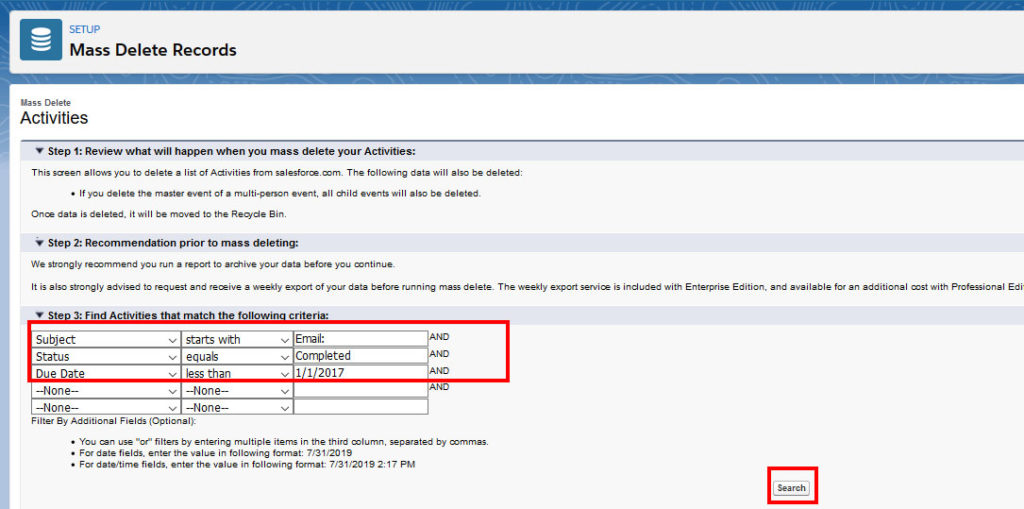
helpH2 Please note that if emails have matched into Activity History, then you are using Standard MatchMyEmail. The data is part of your Salesforce data and you can use native mass delete tools within Salesforce to manage. To delete older Activity records (older than specific date – use Due Date field of task for […]
How do I add another email account for a non-Salesforce User?
helpH2 Match My Email accounts created after June 2019 allow an administrative user to activate users remotely. In the Control Panel, an Administrative User can click Users and choose from a list of active Salesforce Users to activate with the app. However, for an employee that does not have their own sign in […]