
Match My Email Web Tab Will Not Load
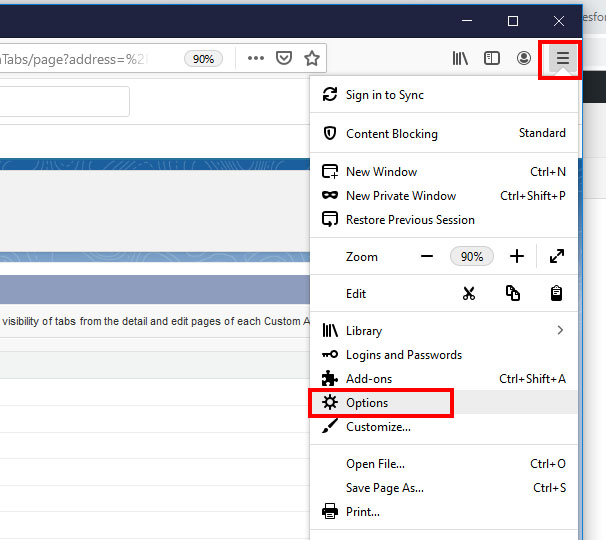
If the web tab for Match My Email will not load (leaving a blank screen) or will not allow a user to navigate the menu (returning to a login screen), you may need to allow cookies, and add a trusted site, in browser settings. Click on your browser to jump to the relevant section. If […]
How to Modify Salesforce Permissions for Match My Email Custom Object

helpH2 Match My Email makes use of a custom object Email Messages and its related Email Messages Related Object to contain and show the matching email information. If Salesforce.com Users are unable to see matched email in the Email Messages section, modifications can be made at user-level, profile-level, and organization-wide depending on edition of Salesforce.com. […]
LCN.com
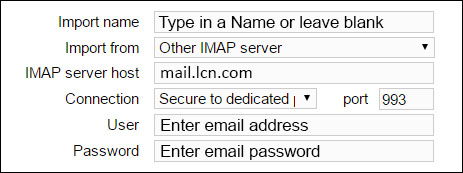
helpH2 IMAP SETTINGS DURING ACCOUNT SIGNUP IMAP SETTINGS on IMPORT TAB For assistance or questions, please contact support@matchmyemail.com. Click here for more specifics from this provider.
Using Apple ID/iCloud 2-Step Verification/2-Factor Authentication
helpH2 Apple iCloud Users have the option of using two-step verification or two-factor authentication. Existing Match My Email Users that choose to use the 2-factor authentication offered for their iCloud email accounts, may get an alert that their IMAP credential should be updated. Users actually need to create a specific app password as recommended […]
Bulk Manual Match from Email Cloud
helpH2 When a User is logged in to Match My Email and viewing the Email Cloud, they can manually match multiple selected messages to the same Salesforce records of their choosing. To do so: In Email Cloud, check the box to left of messages to select them. Click the Create command button. In the Match […]
One.com
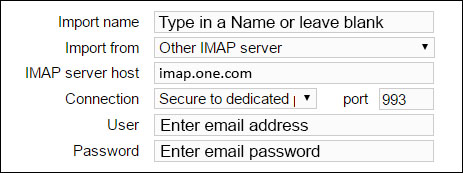
helpH2 IMAP SETTINGS DURING ACCOUNT SIGNUP IMAP SETTINGS on IMPORT TAB For assistance or questions, please contact support@matchmyemail.com.