
If your organization uses Salesforce Partner Community licenses, there is a gap in your activity data. The email and calendar sync tools that work for your standard internal users simply do not work for Partner Community users. This is not a configuration issue or a missing permission. It is a hard license restriction built into every one of Salesforce’s native integration options.
The consequence is straightforward: any emails or calendar events that your Partner Community users send, receive, or attend are invisible to Salesforce unless you bring in a tool designed to work around this restriction. Match My Email, available on the AppExchange, is built to do exactly that.
What Is a Salesforce Partner Community License?
A Salesforce Partner Community license is designed for external partners: resellers, distributors, agencies, and other third parties who need limited access to your Salesforce org. Through Experience Cloud portals, these users can collaborate on leads, opportunities, and cases alongside your internal team.
The key word is external. A Salesforce Partner Community license sits outside the boundaries of a standard internal user license, and the difference matters more than most admins expect. Partner Community users get portal access. They do not get the full suite of internal Salesforce capabilities, including the email and calendar integrations that internal users depend on daily.
Why Native Tools Don’t Support Partner Community Licenses
Salesforce offers three primary ways to sync email and calendar activity into the platform. All three work for standard internal users. None of them work for a Salesforce Partner Community license.
Salesforce Outlook Integration
The Salesforce Outlook Integration embeds a Salesforce panel inside Microsoft Outlook, letting users log emails, create records, and view CRM data without leaving their inbox. It requires a standard Salesforce user license to function. Partner Community licenses do not meet this requirement. Emails sent and received by Partner Community users in Outlook remain entirely invisible to Salesforce.
Salesforce Gmail Integration
The Gmail Integration provides the same embedded sidebar experience for Google Workspace users. Like the Outlook Integration, it requires a standard internal Salesforce license. Partner Community users are excluded by design, leaving a gap in email activity history for any deals or cases they are involved in.
Einstein Activity Capture
Einstein Activity Capture (EAC) is Salesforce’s automated syncing service that continuously pulls email and calendar data from a connected Gmail or Microsoft 365 account and associates it with Salesforce records. EAC requires specific license types, including Sales Cloud or Service Cloud, along with an EAC entitlement. Partner Community users hold neither. Even if a Salesforce admin wanted to extend EAC to a Partner Community user, the platform does not permit it.
The result across all three tools is identical: Partner Community user activity does not get captured in Salesforce through any native mechanism.
Why This Matters in Practice
Partner Community users are often doing customer-facing work that is directly relevant to Salesforce records. A reseller working an opportunity, a distributor coordinating fulfillment, or a consulting partner running a project may send dozens of emails per week tied to accounts and deals inside your org.
Without email sync, three things happen. Managers lose visibility into what partner users are doing. Activity history on records becomes incomplete. And reporting on partner-assisted pipeline becomes unreliable. The missing data is not a minor inconvenience: it creates real blind spots in forecasting and pipeline management.
How Match My Email Fills the Gap
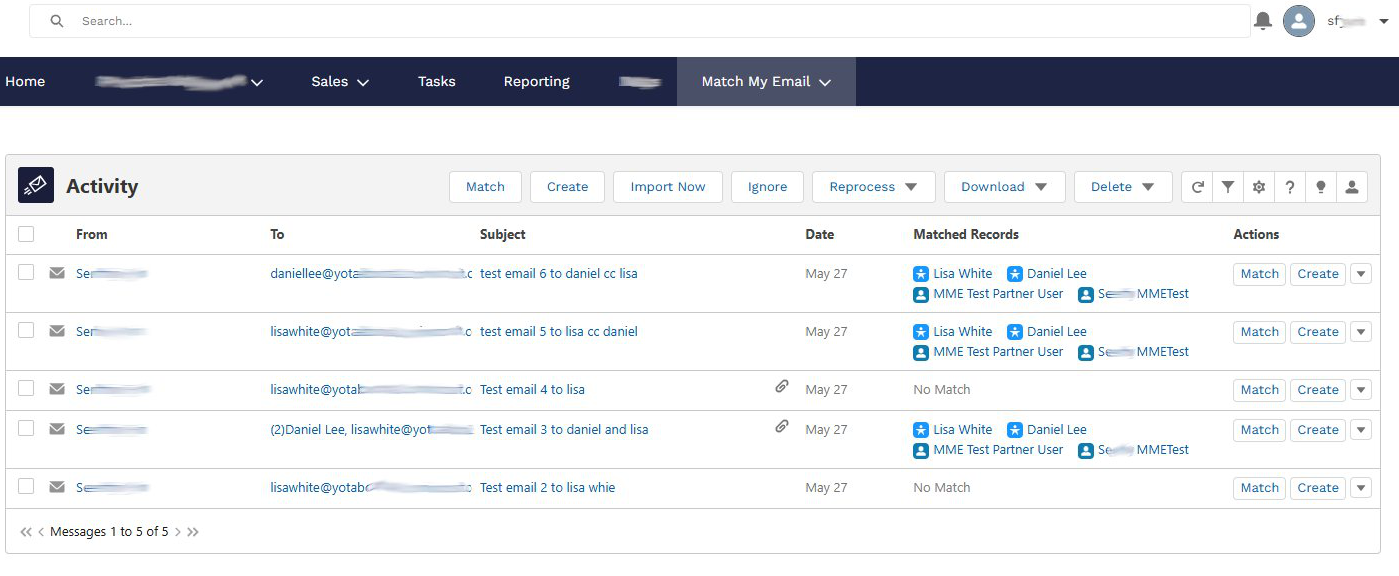
Match My Email is a Salesforce-native email and calendar integration app available on the AppExchange. Unlike Salesforce’s native tools, it is compatible with Partner Community licenses, syncing email and calendar activity for partner users the same way it does for internal users.
The reason it works where native tools cannot comes down to architecture. Match My Email operates as a server-side email matching engine that connects directly to an email account, whether Gmail, Microsoft 365, or any IMAP-based service, and automatically matches and logs emails to Salesforce. Because the matching and logging happens at the server level rather than the individual user-license level, it is not subject to the license restrictions that block Salesforce’s native integrations.
For organizations with Partner Community users, this means:
- Emails sent and received by Partner Community users are automatically captured and logged to Leads, Contacts, Accounts, Opportunities, Cases, and other standard and custom objects.
- Calendar events are synced to Salesforce, giving internal teams visibility into meetings and calls that partner users are having with shared customers.
- Activity history on records touched by partner users becomes complete and accurate, supporting better reporting and pipeline oversight.
- All email data is stored permanently within Salesforce, not in a third-party system, keeping data governance intact.
Match My Email also supports standard Salesforce reporting on captured email activity, giving admins another way to monitor email activity in Salesforce. Sales managers and admins can build dashboards that include partner-driven communication alongside internal user activity, something that is simply not possible with native tools alone.
The Bottom Line
Salesforce’s native email sync tools, the Outlook Integration, the Gmail Integration, and Einstein Activity Capture, are all designed for internal, standard-license users. A Salesforce Partner Community license falls outside the license scope these tools require, and no configuration change can work around that restriction.
For organizations that rely on Partner Community users to manage customer relationships and drive revenue, this gap in activity capture represents a real loss of data and visibility. Match My Email is built to work where native Salesforce tools cannot. By supporting Partner Community licenses, it allows organizations to capture a complete picture of email and calendar activity across both their internal team and their external partner network, all within Salesforce, and without requiring users to change how they work in their email client.
If your partner users are active on deals and you are not seeing their email activity in Salesforce, it is worth taking a closer look at how Match My Email works.
Learn more: Match My Email on AppExchange


