

Recently, one of our customers asked us to implement attachment blocking. This particular customer sends large standard attachments – pdf brochures and pdf investment fund performance statements – to prospects and clients. This Match My Email user did not want these attachments to be uploaded to Salesforce to save File Storage.
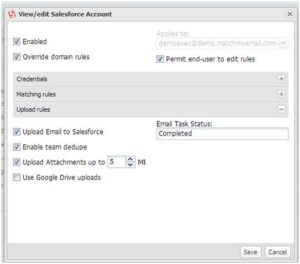 We asked the customer to explain exactly how they wanted the attachment blocking to work. They said that they wanted to block attachments above 1MB, because attachments below 1MB were generally WORD and EXCEL documents that they wanted to see in Salesforce.com. We implemented a setting that strips the attachments during the upload of ‘matched’ email to Salesforce.com but saves the name of attachment in the email record(s) for future reference.
Match My Email development was able to implement this request in our multi-tenant server within one week.
This week, a prospect using the new tool came forward and asked us to block small in-line email images, generally logo images embedded in email signatures. These small jpeg, png and gif images clutter up Salesforce by adding many ‘valueless’ data objects to the system which increases processing load and using up File Storage unnecessarily.
Development has promised to provide a setting for blocking small inline email images by the end of the month.


