
If your organization uses Salesforce Partner Community licenses, you’ve likely run into a frustrating wall: the email and calendar sync tools that work for your standard Salesforce users simply don’t work for Partner Community users. This isn’t a configuration problem or a missing permission, it’s a fundamental license restriction built into Salesforce’s native toolset. Fortunately, the third-party AppExchange app Match My Email was built to fill this gap.
What Is a Salesforce Partner Community License?
Salesforce Partner Community is a license type designed for external partners, resellers, distributors, agencies, and other third parties, who need access to a subset of Salesforce functionality to manage leads, opportunities, and cases collaboratively with the org that licenses them. Partner Community users are external to the Salesforce org, and their license type reflects that: it grants them access to Experience Cloud (formerly Community Cloud) portals, but it does not grant them the full suite of internal Salesforce user capabilities.
This distinction matters greatly when it comes to email and calendar integration.
The Native Salesforce Email Sync Tools
Salesforce offers three primary ways for users to sync their email and calendar activity into the platform: Salesforce for Outlook (now the Outlook Integration), the Gmail Integration, and Einstein Activity Capture. Each will work for standard internal users, but all three share the same critical limitation when it comes to Partner Community licenses.
Salesforce Outlook Integration
The Salesforce Outlook Integration (the modern successor to the legacy Salesforce for Outlook plugin) allows users to log emails, create Salesforce records, and view Salesforce data directly within Microsoft Outlook. It requires a standard Salesforce user license to function. Partner Community licenses do not meet this requirement, meaning Partner Community users cannot install or use the integration. Any emails they send or receive in Outlook remain invisible to Salesforce.
Salesforce Gmail Integration
The Gmail Integration similarly embeds a Salesforce panel inside Gmail, enabling users to log emails and events to Salesforce records without leaving their inbox. Like the Outlook Integration, this tool requires a standard internal Salesforce license. Partner Community users are excluded from this integration by design, leaving a gap in the email activity history for deals and cases they are involved in.
Einstein Activity Capture (EAC)
Einstein Activity Capture is Salesforce’s automated email and calendar syncing service, designed to continuously capture activity data from a connected Gmail or Microsoft 365 account and associate it with relevant Salesforce records. It requires users to have specific Salesforce licenses, including Sales Cloud, Service Cloud, or certain other standard user licenses, along with an appropriate Einstein Activity Capture entitlement. Partner Community users do not hold these license types and therefore cannot be set up with Einstein Activity Capture. Even if a Salesforce admin wanted to extend EAC to a Partner Community user, the platform simply does not permit it.
The result of all three of these limitations is the same: if your organization has Partner Community users who are actively corresponding with customers, running deals, or coordinating on cases, that email and calendar activity is not captured in Salesforce through any native mechanism.
Why This Is a Problem in Practice
Partner Community users are often deeply involved in customer-facing work. A reseller managing an opportunity, a distributor coordinating a delivery, or a consulting partner running a project may send dozens of emails per week that are directly relevant to Salesforce records. Without email sync, managers lose visibility into partner activity, activity history on records is incomplete, and reporting on partner-assisted deals becomes unreliable. The absence of email data for these users isn’t just a minor inconvenience, it can create meaningful blind spots in pipeline management and forecasting.
How Match My Email Solves the Problem
Match My Email is a Salesforce-native email and calendar integration app available on the AppExchange. Unlike Salesforce’s native tools, Match My Email is compatible with Salesforce Partner Community licenses, meaning it can sync emails and calendar events for Partner Community users just as it does for standard internal users.
The core architecture of Match My Email is what makes this possible. Rather than relying on a user-side plugin or an internal Salesforce service that requires a specific license tier, Match My Email operates as a server-side email matching engine that connects directly to an email account (Gmail, Microsoft 365, or any other IMAP-based email service) and automatically matches and logs incoming and outgoing emails to the appropriate Salesforce records. Because the matching and logging process happens at the server level rather than at the individual user-license level, the tool is not subject to the same license restrictions that block the native integrations.
For organizations with Partner Community users, this means:
- Emails sent and received by Partner Community users can be automatically captured and logged to Leads, Contacts, Accounts, Opportunities, Cases, and other standard and custom objects.
- Calendar events can be synced to Salesforce, giving internal teams visibility into meetings and calls that Partner Community users are having with shared customers.
- Salesforce activity history for records touched by partner users becomes complete and accurate, supporting better reporting and pipeline oversight.
- All email data is stored permanently within Salesforce, not in a third-party system, keeping data governance intact.
Match My Email also supports standard Salesforce reporting on captured email activity, which means sales managers and admins can build dashboards that include partner-driven communication alongside internal user activity, something that was simply not possible using native tools alone.
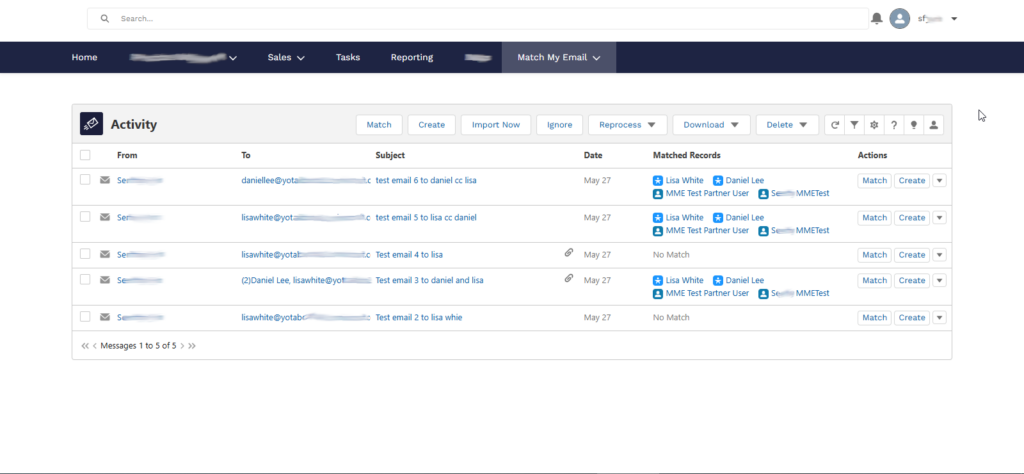
The Match My Email Activity dashboard in Salesforce, showing synced emails and matched records for a Partner Community user.
Conclusion
Salesforce’s native email sync tools, the Outlook Integration, the Gmail Integration, and Einstein Activity Capture, are all built with internal, standard-license users in mind. Partner Community users fall outside the license scope that these tools require, and no amount of configuration can work around that restriction. For organizations that rely on Partner Community users to manage customer relationships and drive revenue, this gap in activity capture represents a real loss of data and visibility.
Match My Email is designed to work where native Salesforce tools cannot. By supporting Partner Community licenses, it allows organizations to capture a complete picture of email and calendar activity across both their internal team and their external partner network, all within Salesforce, and all without requiring users to change how they work in their email client of choice.


